Introducing Purge-it Release 5.3
With the latest release of Purge-it we've focused on giving JD Edwards users more insight, more control and better archiving results
Read more >
Does Data Archiving have a role to play in JDE Data Governance?
We're looking at how managing data through its lifecycle can help support effective JD Edwards data governance.
Read more >
JD Edwards E1 Upgrade SIG presentation
Catch-up with Richard Wilde's June presentation to the E1 Upgrade SIG: Data Archiving as an Upgrade Enabler
Read more >
Handling big data with Purge-it
Discover how Purge-it handles large volumes of JD Edwards data in this blog article
Read more >
The year in review
Looking back on 2025 milestones and ahead to more JD Edwards in 2026!
Read more >
How do you manage JD Edwards data without JD Edwards?
As your JD Edwards system is retired you may start to lose JD Edwards skills and knowledge. Find out how to address this challenge.
Read more >
Data Management for your JD Edwards Data
Is your organization thinking about the subject of data retention for your JD Edwards system? In this article we explore key discussion points around developing a meaningful Data Retention Policy.
Read more >
What is Data Archiving?
Find out how Data Archiving and Data Purging fit into Data Lifecycle Management
Read more >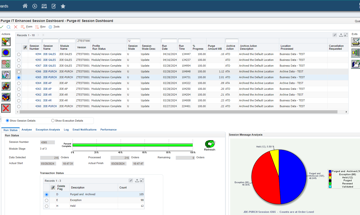
How to delete JD Edwards data that has passed its retention date and not just archive it
If your data archive is growing and you need to take action, check out how functionality in Purge-it Version 5.2 allows the possibility to completely remove old data from the archive
Read more >
How to measure the success of Data Archiving (Part 3)
In the final part of this 3 part series of blog articles 'measuring the success of data archiving', we look at two more customer examples
Read more >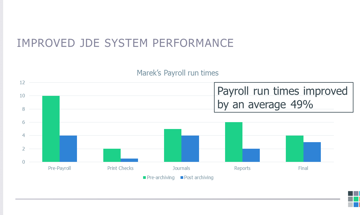
How to measure the success of Data Archiving (Part 2)
In part 2 of 'measuring the success of data archiving', we look at real customer examples
Read more >
How to measure the success of Data Archiving (Part 1)
Can you measure the impact of data archiving? How do you demonstrate ROI? We address these questions and others in this JD Edwards article
Read more >
What is Oracle Validated Integration (OVI)?
Find out how Klik IT achieving Oracle Validated Integration with JD Edwards EnterpriseOne Expertise for its integration of Purge-it can help you and your organization
Read more >
Purge-it Version 5.2 FAQs
Explore some of the most frequently asked questions relating to the latest release of the JD Edwards data archiving solution, Purge-it
Read more >
Is Purge-it easy to use for E1 data archiving?
Purge-it customers tell us one of the key drivers for choosing the data archiving solution is its usability. In this blog post we look at the main factors that make Purge-it easy to use.
Read more >
What is Purge-it?
Find out all about Purge-it. How it works, who it's for and what it offers JD Edwards users
Read more >
Get a JD Edwards data healthcheck
In this blog post we look at how the JD Edwards data archiving solution Purge-it! gives your JD Edwards system a health check.
Read more >
30 features of Data Archiving with Purge-it
Discover the top 30 features of data archiving with Purge-it that make it a truly easy product to implement.
Read more >
What is JD Edwards Archiving as a Service?
You're no doubt familiar with the as a Service model. Discover the business benefits of opting for Archiving as a Service for your JD Edwards E1 data archiving needs in this blog post.
Read more >
8 reasons to automate your JD Edwards archiving
Checkout this second blog post on archive automation. We zoom in on the 8 top reasons to automate your JD Edwards archiving.
Read more >
What is archive automation for JD Edwards?
Find out how human intervention in the routine task of archiving JD Edwards data can be greatly reduced. We’re talking about archive automation. It can help achieve remarkable ongoing efficiencies.
Read more >
What is meant by an integrated JD Edwards archiving solution?
What's the difference between an external and an internal archiving product when it comes to JD Edwards archiving? Read our short blog post as we summarize the differences.
Read more >
Why is JD Edwards running slow?
Deteriorating system performance negatively impacts many job functions across an organization. Find out why you system is slow. Discover how to speed up your JD Edwards system and enhance the user experience.
Read more >
Find out which version of Purge-it your organization is running
Make sure your organization is maximizing its use of the archiving solution Purge-it Find out which software version you have. Discover the latest product enhancements and new Purge-it features and functionality.
Read more >
How Klik IT started 25 years ago...and what's next?
As Klik IT celebrates 25 years in business in 2023, we took some time out to chat to CEO, Terry Clarke.
Read more >
Find a JD Edwards archiving solution that works for your business. Ask these 5 questions.
Is your organization looking for a 3rd party archiving solution?
Checkout 5 key questions to ask when evaluating JD Edwards archiving tools and solutions.
Read more >
Data Retention & Security
Data Retention and Security is a hot topic and a vast subject.
In this Blog post we look at Data Retention and Security from the perspective of organizations running JD Edwards. We cover the key considerations as we see them and provide links to industry articles and information for a broader view of the subject.
Read more >JD Edwards E1 Upgrade SIG presentation

We were delighted to present at the JD Edwards E1 Upgrade SIG meeting.
Here’s a run-down of what was covered in the presentation.
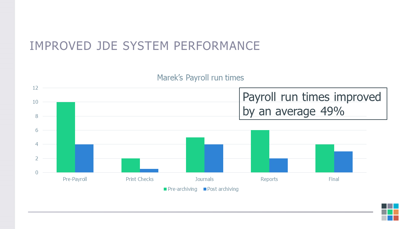
The presentation kicked off with a focus on customer example, Marek.
Reasons Marek needed to archive
- System performance was getting slower, especially around payroll tables
- Taking too long to bring back some queries
- Reports were taking longer to run
- Upcoming 64-bit upgrade. A requirement to remove some data to make the upgrade process more seamless.
Background information
20 years had passed since Marek’s last custom in-house archiving. This had unfortunately caused some issues around data integrity.
What were Marek's options for archiving?
- Use the existing tools available within EnterpriseOne
- The DIY approach
- Select an off-the-shelf data archiving solution.
6 considerations to keep in mind if using the existing tools in EnterpriseOne
1. No audit trail. You don’t know when data was archived and you won’t know who archived the data.
2. It’s not possible to reverse data that’s been archived. If an error is made, and you need to get the archived data back, you’d need to write another UBE to send the data back, or get your DBA to write some SQL. There's no fallback position.
3. No inquiries over the archived data. Once it's moved to another table, if you want to inquire over the data, you have to create your own applications to do this.
4. In some cases data is deleted as opposed to archived. If a mistake was to happen, there's no way to come back.
5. Multi-step process. For example, there are 6 different UBEs for archiving Sales Orders!
6. In the majority of the modules that are covered, there are a number of related tables that are not archived, creating orphan data.
The Do-It-Yourself approach
Let’s look at how you could tackle this.
§ Are you going to write complex SQL at the database level to do your archiving for you?
§ Are you able to write your own audited archiving UBEs to do the job?
§ The DIY approach requires a strong knowledge of your internal processes.
§ It’s likely you’ve got custom tables that you want to archive at the same time.
§ Consider whether there’s a particular kind of development that was done where you change a standard object that then changes relationships between the tables.
§ You’ll need an experienced team of Business Analysts, DBAs, Project Managers, Developers and Testers.
Further considerations
How will you handle internal validations?
For example, SQL routines would have to be written to check the order activity rules.
How would you handle cross-modular validations?
For example, if there’s a Work Order that's related to a Sales Order and that Sales Order is not at a completed status, do you still want to archive the Work Order?
How will you handle relationships with other tables?
When building a framework for this, you need to give thought to commitment control. For example, audit trails are needed to have visibility of who's been archiving the data and when it was archived.
What about access to the archived data?
Despite being a crucial point, this is often overlooked.
Archiving projects in some organizations are led by IT. From an IT perspective, it may be acceptable to assume if data is more than 5 years old, the business won’t need to look at it. However, some industries need access to data for legal reasons for specific amounts of time. Let’s take a Homebuilder example. They may need to go back 10 or 15 years to view the archived data due to industry regulations and guidelines.
What if someone in the business wants the archive data put back into production?
Is everything re-runnable and reversible?
These are examples of possible requirements that need to be considered with the DIY approach to data archiving JD Edwards.
Off-the-shelf archiving products
These are tools specifically developed to archive your JD Edwards EnterpriseOne data.
They fall into two categories.
Generic archiving tool
- Runs at the database layer
- Requires frequent updates when there are changes to the way EnterpriseOne handles data.
For example there was recently a change to order activity rules for Work Orders. With a generic archiving tool you’d need the archiving tool to be changed at the SQL level in order to handle the changes to the logic in EnterpriseOne.
Specific EnterpriseOne tools that run at the application level
Consider selecting an archiving solution that includes:
- Audited approach to archiving
- Safe data archiving using commitment control
If you archive a Sales Order, and there's a problem with committing the data in one of the tables, you don't want half a Sales Order in archive and half in production. You need to use commitment control so that the transaction rolls back - Data boundaries protected
- Data integrity maintained within the system
- Functionality to allow data that's archived to be reversed (a safety net in case of errors).
- Access to archived data
Having a mechanism for providing access to archived data is crucial for the business and data owners.
How Purge-it addresses these challenges
Purge-it is a third party solution developed specifically for JD Edwards EnterpriseOne (also available for World).
What’s different about Purge-it by Klik IT?
- 100% built in the JD Edwards toolset
- Oracle validated integration solution
- 8 Standard Modules; Manufacturing, Purchasing, Sales, Inventory, AP, AR, Payroll and General Ledger
- Custom Module. The Customer Module is incredibly powerful.
Allows you to archive, copy or purge data from any table you can see in JD Edwards.
Examples include; EDI tables, address book, media objects, interoperability tables, plus any of your custom F55 to F59 tables.
Customer examples of using the Custom Module
Customers have used the Custom Module to develop an archiving process for homebuilder tables. There are about 55 - 60 homebuilder tables.
Other customers have used the Custom Module to archive item location table, because it runs quicker than the standard EnterpriseOne UBE.
Why Marek chose Purge-it
- Easy to learn
- Straightforward to use
These reasons relate directly to Purge-it being written and developed in the JD Edwards toolset. It's a familiar interface to everyone.
Marek likes the fact that data integrity issues are highlighted by Purge-it. This enabled them to identify data integrity issues from custom in-house archiving processes many years earlier.
- Archived data is easily accessible.
Easy access to the archived JD Edwards data means users don’t have to log out of their existing environment.
For example, if you log into JPD920 and you want to look at current sales orders, you go to P42101. If you want to look at archived sales orders, still logged into JPD920, you go to the purge it sales menu and run application PYK51901.
- You don't require any SQL expertise and you won't need anyone to do anything at the database level.
Archiving can be automated
You can add the archive routines to the JD Edwards scheduler and set them up to run according to your organization’s requirements. This can be once a year, once a month or every day. Some customers run Purge-it 24/7, round the clock.
In a situation where an organization is generating large quantities of data, daily automated archiving is highly effective. For example, customers in the manufacturing industry that are adding 10 million plus records into single tables every day choose to archive small amounts of data every day. This allows a pro-active, automated approach to data management that is highly effective and efficient (using little to no resource).
A brief overview of the Marek project
- Marek’s data retention policy was 5 years of data in production and 5 years of data in the archive.
Anything older than 10 fiscal years plus was a candidate to be purged. - The archiving was completed in two weeks.
- 46% of the data covered by the standard Purge-it modules was archived.
Access the full Marek Case Study here
News Snapshot...
Available on demand
If you were unable to attend or would like to revisit the presentation, you can do so on the Quest Oracle Community website here.
Purge-it Demo
The E1 Upgrade SIG presentation includes a live Purge-it demo. The demo shows a job being run to archive Purchase Orders. Progress can be monitored on the Purge-it Session Dashboard. See how exceptions are flagged and how NEW functionality allows the option to override these exceptions if required.
The demo also shows an example scenario of how data can be reversed. The example is where a colleague requests access to specific data that has just been archived.
Access the full Marek Case Study